Heart-rate variability (HRV)
The gap-to-gap variation between heartbeats. Higher and steadier usually tracks with a recovered nervous system; it swings hard night to night, so a single reading means little on its own.
Tracking recovery on Apple Watch means letting the watch record your overnight HRV, resting heart rate and sleep, then reading those signals against your own baseline to judge how ready you are for the day. The watch already captures the raw data — what you add is a way to turn three numbers into one. This guide walks the whole loop: what the watch records, how to set it up, how recovery is actually read, and the pay-once, on-device app that does the synthesis for you.
Lock the $15 founding price.
Recovery you own, on the Apple Watch you already have — pay once, no subscription. Join free now and lock $15 before it rises to $24.99 at launch.
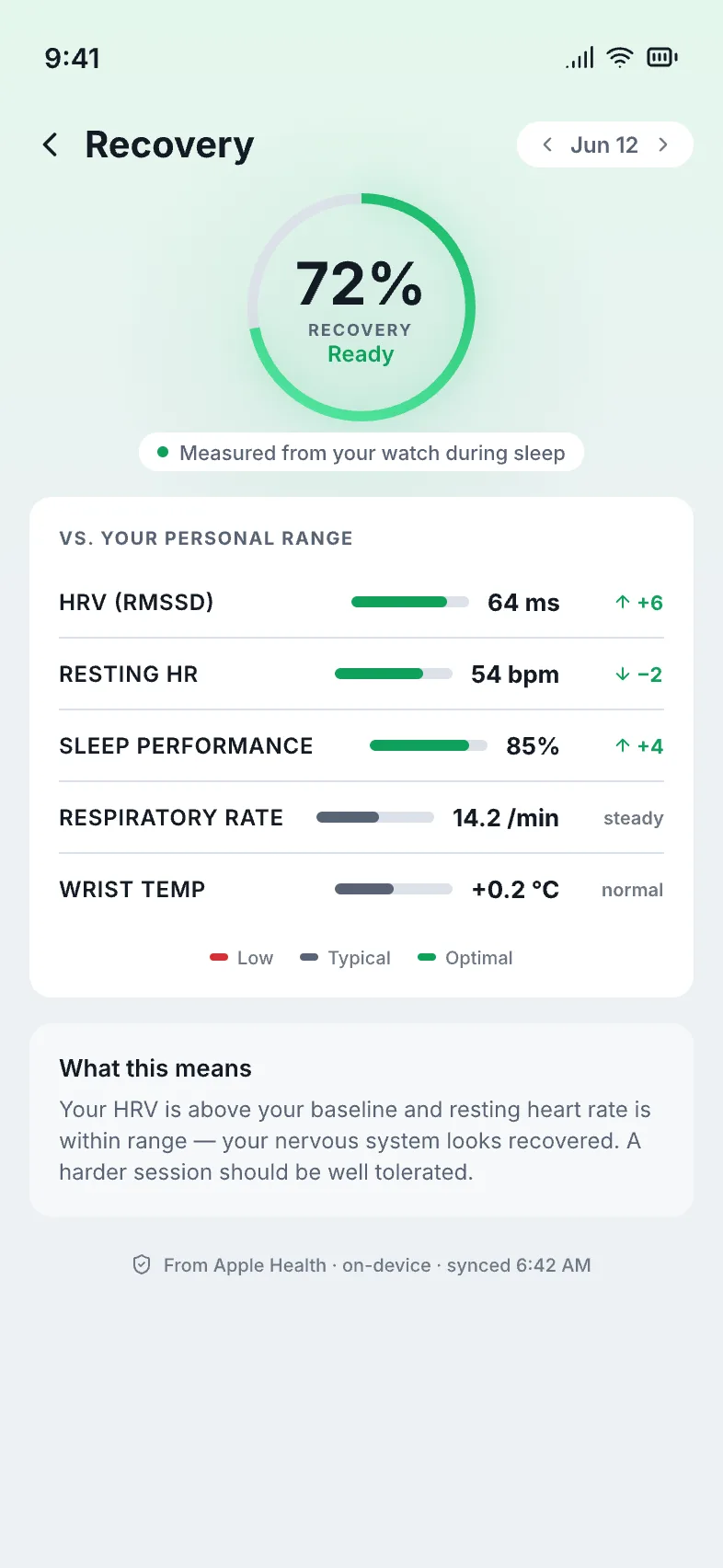
One calm morning recovery score — computed on your own device from the signals your Apple Watch already records.
Three overnight signals. Recovery tracking is built on heart-rate variability, resting heart rate and sleep — all of which an Apple Watch already logs into the Health app while you wear it to bed. You are not adding a sensor; you are reading sensors you already own.
The gap-to-gap variation between heartbeats. Higher and steadier usually tracks with a recovered nervous system; it swings hard night to night, so a single reading means little on its own.
Your heart's idle speed. It is far steadier than HRV, so a sustained climb above your personal normal is one of the clearest tells that you are under-recovered.
How long and how consistently you slept is the foundation everything else sits on. Track the trend, not one rough night — a single short night is noise, a week of them is a signal.
Want the plain-language tour first? See exactly what your Apple Watch already tracks — a free explainer, no signup.
Three new readouts — but no single recovery score. Per Apple's watchOS 26 release (September 2025); last checked June 2026, the watch added a Sleep Score, Training Load and a Vitals app, and it already logs HRV and resting heart rate automatically, each on its own chart. They are useful pieces, but you still have to read them separately and against your own normal.
Rates last night's sleep only — duration and consistency — per Apple's watchOS 26 release (September 2025); last checked June 2026. Read it as how well you slept, not how recovered you are. Watch the trend, not one number.
Scores workout strain over 7 and 28 days, per Apple's watchOS 26 release (September 2025); last checked June 2026. It tells you how hard you've been pushing — the demand side — not how ready your body is to push again.
Flags a night that drifts from your baseline, per Apple's watchOS 26 release (September 2025); last checked June 2026. Read it as an outlier alert — a "something's off" flag — not a score; it doesn't grade how recovered you are.
The gap: even with Sleep Score, Training Load and Vitals, Apple Watch still has no single combined recovery or readiness score that folds HRV, resting heart rate and sleep against your baseline into one morning number — per Apple's watchOS 26 release (September 2025); last checked June 2026. That one number is exactly what cowe computes, on-device, from the data your watch already records.
Wear it overnight and let it collect. Recovery tracking lives or dies on consistent nights of data, so the setup is about making sure the watch is actually recording while you sleep. Five steps get you there.
Against your own baseline, not a population average. Recovery is not an absolute — there is no universal "good" HRV. What matters is where today sits relative to your personal normal, and which way the trend is heading.
A "70 ms" HRV is meaningless until it is compared to your own range. Below your normal and falling is the under-recovered signal; at or above is a green light — and your normal is nobody else's.
One off reading — a late dinner, a glass of wine, a noisy room — is noise. A multi-day drift in HRV or a climbing resting heart rate is the part worth acting on.
HRV down, resting heart rate up and short sleep all pointing the same way is a stronger story than any one number. Read in isolation, each can mislead; read together, they agree.
Early on, or after gappy nights, the honest answer is "not sure yet." A tool that admits when it lacks data beats one that fakes a confident number every morning.
Going deeper on one signal? Read what a good HRV actually is and how an Apple Watch recovery score is put together.
cowe does the synthesis the watch leaves to you. The Apple Watch records the signals and the Health app stores their history, but watchOS never rolls them into a single morning recovery number. cowe reads the overnight HRV, resting heart rate and sleep your watch already captured and returns one calm readiness score — computed entirely on your device.
Three signals become one score you read in a glance — no charts to interpret before coffee, no dashboard to study.
cowe measures each night against your own history, so the score reflects your recovery — not a stranger's average dressed up as yours.
When it has not seen enough of your nights, or the data is patchy, cowe says so instead of forcing a number it cannot stand behind.
Every score is computed on your iPhone and Apple Watch. No account, no cloud, no tracking — and one $24.99 purchase, never a subscription.
This page is part of our Apple Watch recovery app guide. New here? Start at the cowe waitlist to lock the founding price.
It records the raw signals — overnight HRV, resting heart rate and sleep — but does not combine them into one recovery score. cowe adds that synthesis, reading them against your own baseline.
Recovery is relative, so it needs your baseline first — a couple of weeks of consistent overnight wear. cowe tells you when it hasn't seen enough nights yet.
No. The Sleep Score grades last night's sleep only — per Apple's watchOS 26 release (September 2025); last checked June 2026. Recovery also needs your overnight HRV and resting heart rate read against your baseline. Even with Sleep Score, Training Load and the Vitals app, Apple Watch has no single combined recovery score; cowe folds all three signals into one morning number, on-device.
No. The same HRV, resting heart rate and sleep are already on your wrist. cowe reads them from the Apple Watch and iPhone you own — nothing extra to buy or charge.
On your devices. cowe computes every score on your iPhone and Apple Watch — no account, no cloud, no analytics. It is a wellness tool, not a medical device, and does not diagnose or treat anything.
One calm morning readiness number from your own HRV, resting heart rate and sleep — computed on-device, read against your baseline, honest when it isn't sure. No account, no cloud, no subscription. Join the waitlist and lock the founding price.