Apple Watch HRV how-to

How to see HRV on Apple Watch.

To see your HRV on Apple Watch, open the Health app on your paired iPhone, tap Browse, tap Heart, then tap Heart Rate Variability. The watch records HRV automatically while you wear it, so there is nothing to switch on — the number lives in the Health app, not on a watch complication. This guide walks the exact path, shows you how to read the chart, and explains why one reading tells you almost nothing on its own.

Lock the $15 founding price.

Recovery you own, on the Apple Watch you already have — pay once, no subscription. Join free now and lock $15 before it rises to $24.99 at launch.

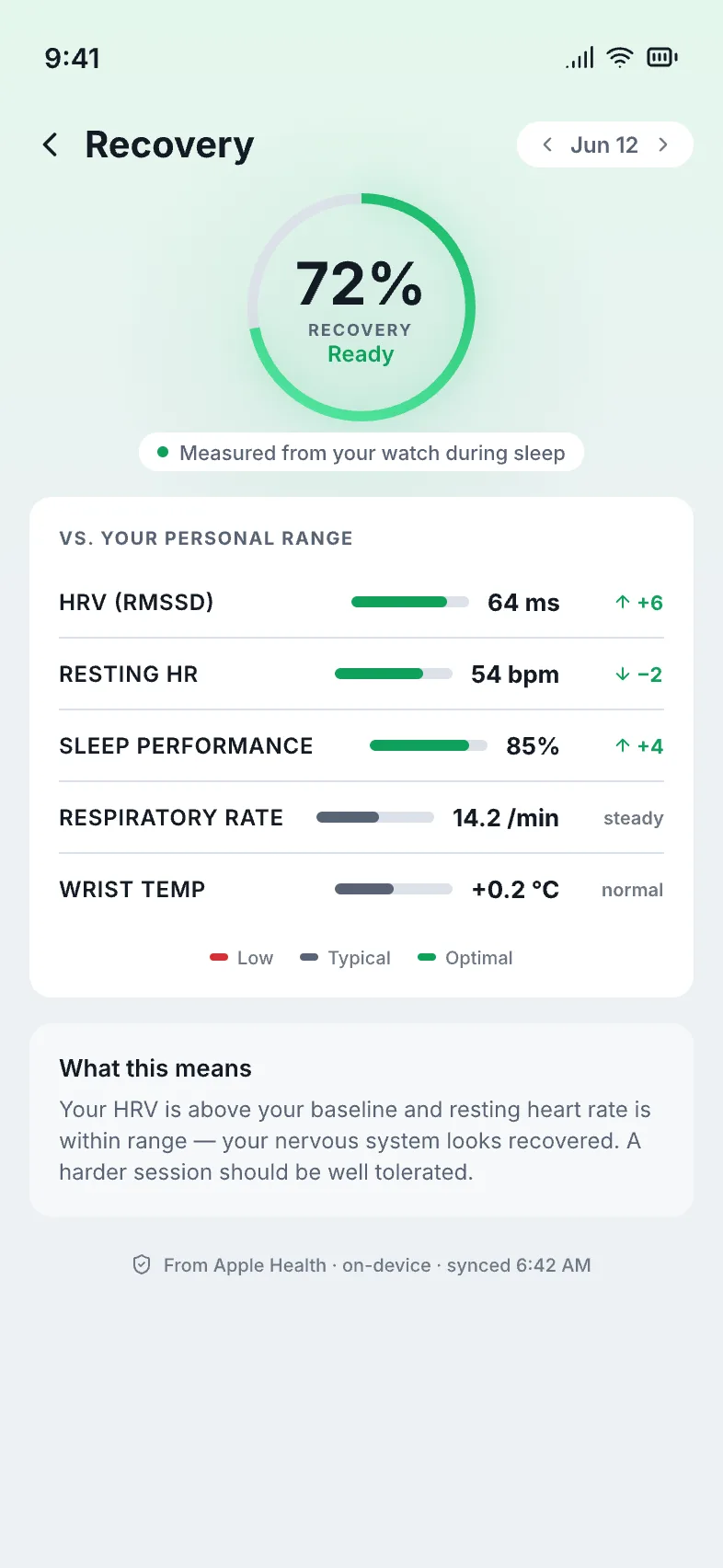
cowe's morning recovery score on iPhone, read from the Apple Watch's overnight HRV, resting heart rate and sleep cowe's morning recovery score on iPhone, read from the Apple Watch's overnight HRV, resting heart rate and sleep

One calm morning recovery score — computed on your own device from the signals your Apple Watch already records.

Where is HRV stored on the iPhone and Apple Watch?

In the Health app, under Heart. The Apple Watch is the sensor and the iPhone's Health app is the logbook — your HRV readings flow from the wrist into Health, where they are kept and charted over time. Here is the path, tap by tap.

  1. Open the Health app on your iPhone. HRV is not displayed on the watch face — you read it on the paired phone, where every reading the watch takes is stored.
  2. Tap Browse, then tap Heart. Browse is the tab at the bottom right; Heart is one of the health categories inside it. (You can also use the search field at the top and type "heart rate variability.")
  3. Tap Heart Rate Variability. This opens the HRV chart. Each point is a reading the watch took, with the most recent value shown at the top in milliseconds (ms).
  4. Switch the range to W or M. The Day view shows scattered single readings; switch to Week or Month to see the shape that actually matters — your personal trend, not one dot.
  5. Tap "Add to Favorites" if you want it handy. That pins HRV to the Health Summary tab so you can glance at it without retracing the path each time.

New to the wrist sensors behind all this? See what your Apple Watch already tracks — a free, plain-language explainer, no signup.

What does the HRV number actually mean?

On its own, very little. Heart rate variability is the tiny variation in timing between heartbeats, and it swings hard from night to night with sleep, alcohol, late meals, stress and even the room temperature. The single value the Health app shows you today is a snapshot of a noisy signal — useful only once you can see it against your own history.

There is no universal "good" HRV

An HRV value that is high for one person is low for another — it shifts with age, fitness and physiology. Comparing your number to a stranger's, or to an online "ideal," tells you nothing. Your own range is the only honest yardstick.

The trend is the signal

One reading is weather; the multi-day line is climate. A single dip after a bad night is noise. A sustained drift below your normal — or a steady climb back up — is the part worth paying attention to.

HRV rarely travels alone

When your HRV drops, your resting heart rate often rises and your sleep gets shorter or choppier. Read together, the three signals corroborate each other; read in isolation, any one of them can mislead.

It is a wellness signal, not a verdict

HRV reflects how taxed your system has been — handy for training and rest decisions, not a diagnosis. A low morning is a nudge to take it easy, not a medical alarm.

Want the deeper take on the number itself? Read what a good HRV actually is and why "your own baseline" beats any chart of averages.

How do I turn the HRV chart into something useful each morning?

Read it against your own baseline — or let an app do it for you. The Health app stores and charts your HRV, but it stops there: it does not tell you what today's reading means relative to your normal, and it does not combine HRV with your resting heart rate and sleep. That synthesis is exactly what cowe does.

It reads the HRV you already have

No new sensor and no extra band. cowe reads the overnight HRV your Apple Watch already records, exactly the same data the Health app charts — there is nothing new to set up.

It compares it to your own normal

cowe learns your personal HRV range over a couple of weeks, then reads each morning's value as above, at or below where you usually sit — never against a population average.

It folds in RHR and sleep

HRV is one of three signals. cowe reads it alongside your resting heart rate and sleep and rolls all three into a single morning readiness score, so you read one number instead of three charts.

It admits when it isn't sure

Early on, or after gappy nights, cowe says so instead of faking a confident number. A score you can trust is one that tells you when it doesn't have enough of your data yet.

Does reading HRV this way send my data anywhere?

No. Your HRV stays in Apple's Health app on your own device, and cowe keeps it that way. Every score cowe computes happens on your iPhone and Apple Watch — there is no account to create, no cloud to sync to, and no separate band or ring to buy. You read your own data, on hardware you already own, and it never leaves your devices.

  • Pay once — $24.99 ($15 founding on the waitlist)
  • 100% on-device
  • No account, no cloud
  • Runs on the Apple Watch + iPhone you own

Want the bigger picture? See the full Apple Watch recovery app guide, or how to track recovery on Apple Watch end to end.

Common questions

Can I see HRV on the watch face itself?

Not as a live number the way you see heart rate. The watch takes HRV readings in the background and stores them in the Health app on your iPhone, which is where you view the chart.

Why is my HRV chart empty?

HRV mostly comes from background readings while you sleep or sit still. Wear the watch to bed, keep it charged overnight, and give it a few days — readings accumulate, they don't appear instantly.

What unit is Apple Watch HRV in?

Milliseconds (ms). Apple reports HRV as SDNN — the variation between heartbeats over a reading. Higher and steadier usually tracks with a more recovered state, but only relative to your own range.

Is HRV from the watch a medical reading?

No. It is a wellness and fitness signal based on your own data, and so is the readiness cowe builds from it. It does not diagnose, treat or prevent any condition — for health concerns, see a doctor.

Stop reading the HRV chart — get the morning score it's missing.

Your Apple Watch already records HRV. cowe reads that trend against your own baseline — with resting heart rate and sleep — into one calm morning readiness number, computed on-device. No account, no cloud, no subscription.

  • Pre-launch · watchOS + iOS
  • No account, no cloud
  • Pay once